Self Hosting Git For Fun And Community
Moving away from Github
Github was magical to me when I first joined in 2020. In 2026, less so. The last eight to twelve months of intermittent downtime and the predatory nature of “opt out” as a default for feeding my code to LLMs left me looking for other solutions.
This is to say nothing of the quality of the average contribution that is now on the site. Issues conversations, Pull Requests, etc are flooded with slop. Human attention requires human effort. Better tools are no excuse for lower quality output.
As a side note, does anyone find the Github homepage useful other than the repos section on the left? If so, drop me a line - I have to be missing something.
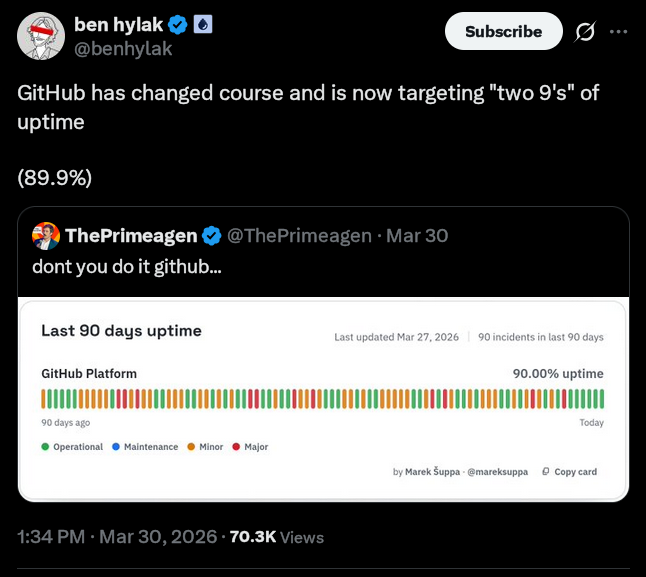 -They were approaching the wrong kind of two 9’s
I self hosted for a bit. I did all the local configuration on a VPS on Digital Ocean and I quite liked it. It was cozy and I owned it end to end. Backups with the provider ensured i had a daily snapshot incase anything ever went wrong. I had a custom domain i could push to. But it was totally invisible. The original idea of “social software development” that Github used to lead with remained appealing.
Enter Tangled
Tangled Is a git forge that is built on Atproto. I was unfamiliar with this protocol before getting onto Tangled but it powers services like Bluesky. I don’t hold that against them.
Atproto’s docs provide this interesting TL;DR
Atproto is big-world, open social. Users publish JSON records into repositories. The changestreams of those records then sync across the network to drive applications.
Read more here
Tangled bills itself as
A new social-enabled Git collaboration platform, built on top of the AT Protocol. We envision a place where developers have complete ownership of their code, open source communities can freely self-govern and most importantly, coding can be social and fun again.
I advise spending some time with the docs because the how is quite interesting.
Anyways, you can use their service just like Github. But unlike Github you can self host your code and still get to plug in to a social element due to it being build on this open protocol. And with that, they had my attention. I dove right into setting up my own Knot.
Setting Up Knot
Knot is Tangled’s code forge server. Similar to Forgejo in many ways but Knot lacks a UI by default. The main TLD tangled.org manages the UI from what i can tell after a quick review of the repo.
Setting up my server was definitely an… adventure. As is often the case with new or pre-release software (which Knot and Tangled are) there were a few rough edges. Most of my issues stemmed from trying to go the docker route as listed in the docs via the community maintained docker installation.
They also have a NixOS option as well as installing from source. I believe these may be more straight forward since they wont have the outdated docker setup. I did not have a good way to get NixOS onto my Digital Ocean VPS so if you do not want to use NixOS, try from source (or use my repo).
Once you have completed the setup, adding your self hosted Knot is pretty easy. Follow the new repo flow and then you will see an option to add your server.
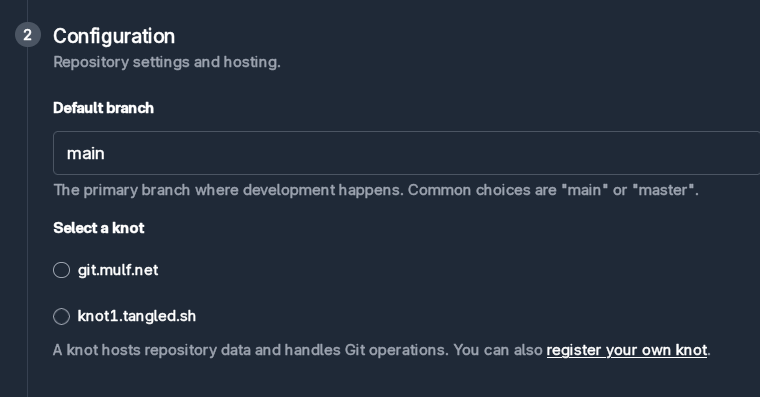
And then add your link to your Knot. Initially my knot was “unverified” when i first added it but clicking the unverified button again reran the verification and seems to be successful.
This setup does require a tweak to your local ssh settings. I may be able to remediate this in the future by swapping the default ssh port to 2222 instead and letting git operations run via 22 but for now this is good enough. Here my config, adapt it as needed.
in ~/.ssh/config
Host git.mulf.net
    HostName git.mulf.net
    User git
    Port 2222
    IdentityFile ~/.ssh/id_ed25519
    IdentitiesOnly yes
Git Operations
With Git everything just works. Use the CLI as normal. Just make sure to add your origin as provided on the website when the new repo is created. It will look something like this:
git remote add origin git@git.mulf.net:did:<did-here>
From the few repos i have set up, the identifier changes every time so just grab that and add the origin in your project. From poking around with some of the settings, it seems like this ID keeps the references stable even if you rename the repo, very nice.
Network Effects
So now we have our own hosted git server via Knot. Aren’t we right back where we started? No, not at all. And that is the exciting bit. The protocol integration puts our hosted git server on the Atproto network for all to see. All of your activity will reflect on your profile on tangled.org. You could even build your own bespoke UI if you index the protocol data and display it however you like.
Now what?
Commit as you normally would. Push to your hearts content. Send PR’s.
Tangled is in alpha but the team has been hard at work for over a year and did a fund raise not too long ago. I am thinking of mirroring my code from Tangle to Github while many are doing the opposite. One thing i did want to mention is that there is no concept of a private repository as far as i can tell. Whenever you create a new repo via the UI there no visibility setting at all. There are no secrets. I am ok with that for now.